CropMarksAI for Adobe Illustrator
Ultra-fast native C++ prepress plugin for Adobe Illustrator (CC 2020 – 2026+ x64). Generates precision vector crop marks, registration crosshairs, ISO 12647-2 / 12647-7 CMYK color bars, document info banners, and white knockout underlays in <1 ms directly in process memory.
Traditional ExtendScript (JSX) solutions struggle on complex multi-card impositions, creating sluggish delays, freezing UI, and generating unwanted inner cut lines. CropMarksAI executes directly in Illustrator.exe memory, delivering instant results with strict prepress fidelity.
Key Prepress & Performance Features
Direct geometry calculation and path creation via Adobe Illustrator SDK suites (sAIArt, sAIPath, sAIPathStyle). Up to 100× faster than scripts on layouts with hundreds of objects.
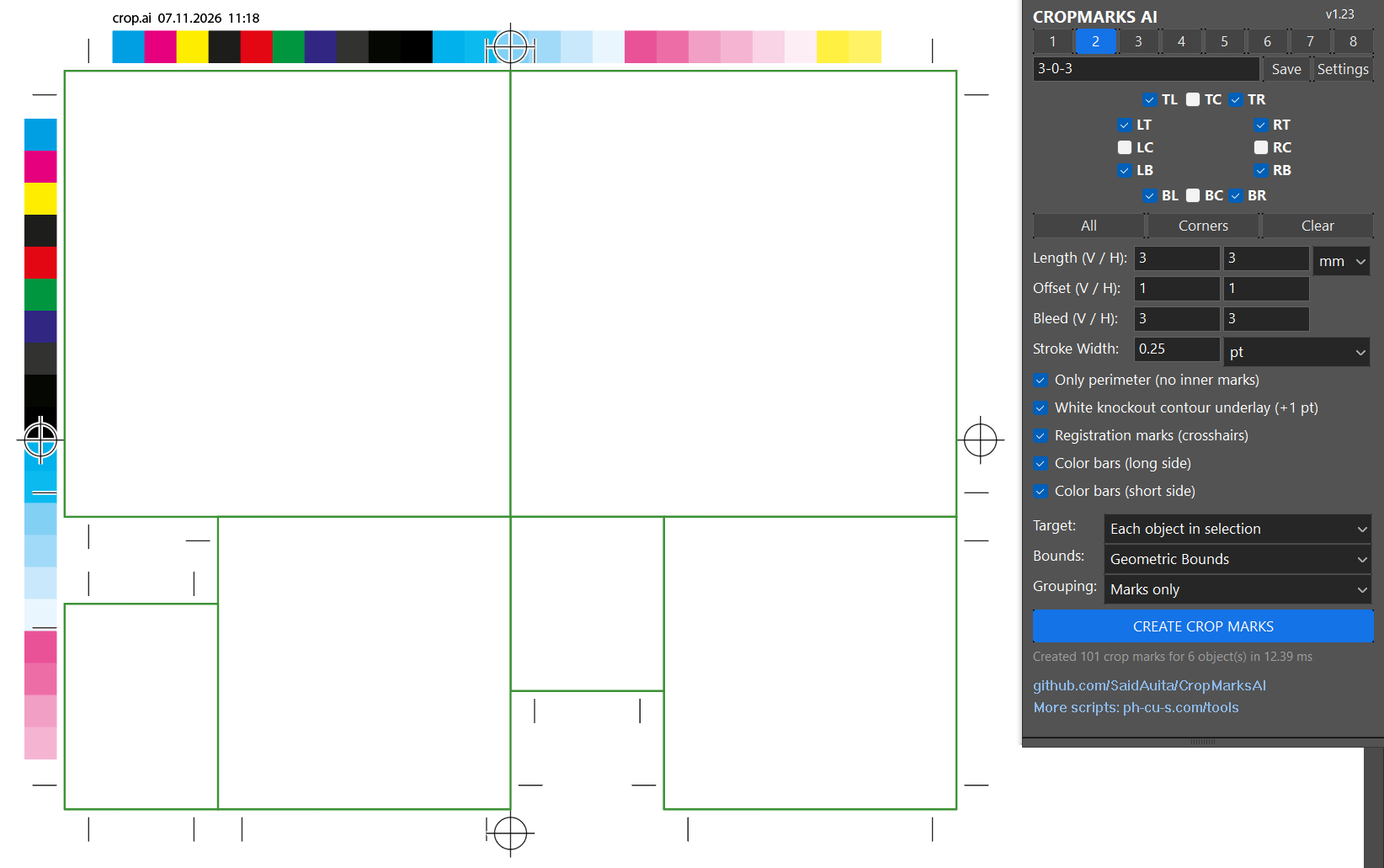
Corners (TL, TR, BL, BR), sides (LT, LB, RT, RB), and centers/folds (TC, BC, LC, RC). Quick selector buttons: All, Corners, Clear.
Dual concentric ring targets (outer Ø 4 mm, inner Ø 2 mm) with 6 mm crosshairs automatically positioned on all 4 sides. Features a knockout white underlay (+1.2 pt) for crisp contrast on dark background bleeds.
Full prepress color control: choose commercial offset (ISO 12647-2) or digital proofing (ISO 12647-7) in Short or Long formats (with tints, overprints, and gray balance). When the strip finishes, it seamlessly repeats across wide imposition sheets with a 4 mm gap until reaching the -3 mm boundary.
Optional prepress banner prints the document filename, date, and timestamp in 5 pt Registration color 1 mm above the top color bar. Configure layer ordering in Settings (Above or Below color bars).
Places crop marks strictly along the outer bounding perimeter of grouped layouts (business cards, stickers, labels), preventing unwanted internal cut lines through your artwork.
Strokes are assigned true Registration color across all separation plates. Optional white knockout underlay (+1 pt) guarantees clear visibility over dark or solid background bleeds.
Fast switching between 8 custom preset slots ([1] .. [8]). Global hotkeys: F4 (Toggle Panel), Shift + F4 (Quick Apply), Enter (Create/Save).
Download Plugin
Tested on Adobe Illustrator CC 2020 – 2026+ (Windows x64). Open source on GitHub under MIT License.
⚡ Download Native Plugin (v1.23 ZIP — Recommended) 📦 GitHub Release v1.23 View C++ Source on GitHubQuick Native Installation:
- Close Adobe Illustrator.
- Extract
CropMarksAI_Plugin_v1.23.zipand runInstall_Plugin.batas Administrator (automatically installs into all detected Illustrator versions). - Launch Illustrator: open Window > CropMarksAI or press F4.
- Press Shift + F4 for instant Quick Apply without opening the palette!