PH-CU-S | AI Code PRO | ID Code PRO
EN | RU
PRO LICENSE Lifetime • Up to 3 Computers

AI Code PRO Activation Key

Lifetime license with full access to all future updates. Unlocks all 18 1D vector barcode standards, Bearer Bars for ITF-14, designer QR editor with logo cutout, duplex printing (4+4 / 1+1), Excel batch generation with photo placement (#img1, #img2), pure vector CMYK EPS without rasterization, and built-in screen scanner.

🌐 Device Management πŸ”‘ Offline Activation
LATEST BUILD Version: v3.01.81

Download Latest Version

Enter your license key to verify and instantly get your secure download link.

AI Code PRO Version History & Changelog:

Version 3.01.81

✨ Added

  • Quick Row Jump Navigation: interactive numeric input fields (#barcode_row_input / #qr_row_input) to jump instantly to any row in datasets with thousands of records on Enter.
  • Range Filter with "Show" Button: opens the data viewer filtered strictly to the selected row range (e.g. rows 100–150) with an informative header.
  • Built-in Data Viewer Drawer: collapsible two-column table displaying full record details with automatic row wrapping for long descriptions and ingredients.
  • 1-Click Template Tag Insertion: click any field name to insert the corresponding [tag] directly into the selected Illustrator text frame or at the cursor position with full Undo (Ctrl+Z) support.
  • Column Pagination (50 fields per page) for wide datasets with smart auto-hiding for clean UI.

⚑ Improved & Optimized

  • Zero Lag Architecture for Massive Datasets: dropdown virtualization (100-row window around current record) prevents CEP/Chromium lag on files with 10,000+ entries.
  • Robust Template Tag Sanitization: cleans redundant quotes from tags like ["description"] or ['price'] and handles quoted placeholders seamlessly.
  • Fixed single card population ("Fill") in template mode with duplex safety checks.
  • Localization fix for range separator ("to") across all 8 supported UI languages.
  • Added macOS first-launch troubleshooting guide for Gatekeeper/Quarantine bypass.

Version 3.01.34

✨ Added

  • Smart barcode fitting for target [BOX] frames: automatic module calculation and bar height clipping for clean codes, proportional scaling for structural codes (ISBN, ITF-14).
  • Duplex 4+4 / 1+1 Print Mode: simultaneous generation of paired artboards (Front & Back) for business cards and badges with independent text, code, and photo substitution.
  • Automated Linked Image Placement (#img1, #img2) into layout frames supporting PNG, JPG, EPS, AI, PDF, TIF, PSD, SVG with recursive subfolder search.
  • Smart Logo Auto-scaling: strict 100% for vector art and noise-filtering bounding box detection for raster logos.
  • Informative tooltips for IMG1 and IMG2 buttons listing all supported graphics formats.

⚑ Improved & Optimized

  • Independent single code generation ("Create Code") isolated from target frames: created cleanly at position rule ("pos:") without overwriting templates.
  • Auto-fill for module and height geometry fields when switching barcode types with valid sample codes for instant preview.
  • Strict DOM operations audit (No Document Scans) without linear document traverses when locating frames and colors.

Version 3.01.00

✨ Added

  • Pure vector CMYK EPS generation without rasterization (Link and Embed modes) for flawless prepress output.
  • Logo silhouette cutout mode "From Document" (From Doc [QR_shape]) with direct path reading from artwork.
  • Vector auto-tracing for logos with unified silhouette outline creation (Vector Silhouette).
  • Equidistant clearance buffer (Offset Path) around logos to prevent module overhang.

⚑ Improved & Optimized

  • Optimized QR matrix calculation for large logo clearance buffers.
  • Fixed positioning and Z-order of code elements in complex layout groups.

Version 3.00.80

✨ Added

  • Unified Selection Tag Bar: [BOX], [COLOR], [SHAPE], [IMG1], [IMG2], and [βœ•] buttons for 1-click layout setup.
  • Real-time Readability Analysis powered by the ZXing WASM engine.
  • Complete UI localization across 8 languages (RU, EN, DE, ES, FR, JA, PT, ZH) with instant switching without restarting Illustrator.

⚑ Improved & Optimized

  • Real-time checksum validation for all 18 barcode standards.
  • Eliminated runtime error when reading barcode geometry parameters.

Version 2.26.00

✨ Added

  • Parametric artboard batch grid layout (Z-pattern, N-pattern, rows, columns, LTR/RTL, custom spacing).
  • Support for arbitrary Unicode text tags ({Field_Name}) in all languages.
  • Word-by-word FirstName LastName replacement inside a single text frame preserving original styles.
  • Barcode color inheritance from swatches or [Barcode_Box] fill.

⚑ Improved & Optimized

  • Preserved user barcode geometry settings when browsing through data records.
✨ RELEASE v3.01.81: ROW JUMP NAVIGATION, BUILT-IN DATA VIEWER, 1-CLICK TAG INSERTION, ZERO LAG

AI Code PRO

100% vector generation for all 18 global 1D barcode standards and designer QR codes directly inside Adobe Illustrator CC 2020–2026+. Smart [BOX] fitting, duplex layouts (4+4 / 1+1), automated photo placement (#img1, #img2), direct export of pure CMYK EPS without rasterization, batch generation of hundreds of labels from Excel, and built-in screen scanner.

18 1D Standards 5 QR Types Smart [BOX] Fitting Duplex 4+4 / 1+1 Mode Photo Placement #img1 & #img2 Pure CMYK EPS From Doc Cutout [QR_shape] Role Tag Bar [BOX] [COLOR] Excel Batch Processing ZXing WASM Scanner BWR Compensation 8 UI Languages CC 2020 – 2026+
AI Code PRO Feature Preview
18 1D Barcode Standards 1 / 13
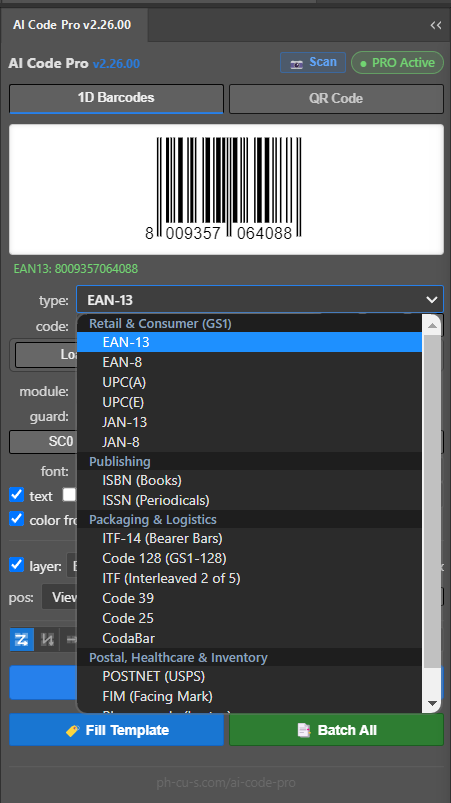
Mathematically exact vector generation for all 18 world standards: EAN-13, EAN-8, UPC-A, UPC-E, JAN-13, JAN-8, ISBN, ISSN, ITF-14, Code 128, GS1-128, Code 39, Code 25, HIBC, Pharmacode, Codabar, Postnet, Telepen.
RELEASE v3 — MAJOR LOGIC & INTERFACE OVERHAUL

Key Features in AI Code PRO v3

Intelligent barcode geometry fitting to bounding boxes, double-sided 4+4 printing, automated image placement, pure vector CMYK EPS without rasterization, and a 1-click role assignment bar.

πŸ“ Smart Fitting into [BOX] Frame

Specialized feature engineered for packaging, labels, and product tags. Draw any rectangle for your code and tag it as [BOX] via the Role Bar button — the engine detects the barcode standard and perfectly adapts geometry without distortion:

  • Multiple codes per layout: a single document or label can have several boxes simultaneously (e.g. retail EAN-13, logistic Code 128, and a QR code). Each code calculates and adapts completely independently to the exact dimensions and proportions of its own box.
  • Pure 1D Barcodes (EAN-13, EAN-8, UPC-A, UPC-E, JAN-13, Code 128, Code 39, ITF, Codabar, Pharmacode):
    • By width: base module width calculates precisely from box width including quiet zones — 100% width coverage.
    • By height (GS1 Bar Truncation): bar height dynamically adapts to the top box edge, leaving exact space for human-readable digits below. Module line thicknesses remain 100% true with zero optical distortion or scannability loss.
  • Structural Codes (ISBN, ISSN, ITF-14 with Bearer Bars, POSTNET, FIM, or codes with top header text): contain mandatory headers (“ISBN 978-...”) or closed protective frames — scaled strictly proportionally and centered in the box with zero risk of clipped text.
  • QR Codes: proportional fitting, auto-centering, vector logo cutouts (Circle, Diamond, Polygon, From Doc), and automatic background fill.
  • Rotation Awareness: automatic detection of box orientation (0°, 90°, -90°, 180°) with size transposition for vertical barcodes.
  • In-Place Z-Order Preservation: generated code is created on the box's layer and assumes its exact stacking position among artwork objects.
  • Universal Engine Compatibility: works in single generation (“Fill”), Batch mode, and Duplex 4+4 across all engines (Native, Link EPS, Embed EPS) with instant 1-step Ctrl+Z undo.

πŸ–ΌοΈ Linked Image & Photo Placement (#img1, #img2)

Automated personalization of design layouts with employee photos, badges, or product catalog thumbnails:

  • Data Column Binding: automatically detects #img1 and #img2 columns in Excel/CSV tables or reads the last two table columns.
  • All Popular Graphic Formats: direct placement of PNG, JPG, EPS, AI, PDF, TIF, PSD, SVG files proportionally fitted into [IMG1] and [IMG2] placeholder boxes.
  • Smart Directory Discovery: auto-locates image files in img1/, img2/, images/, links/, photos/ subfolders relative to the active data sheet.

✨ Logo Cutout from Document (From Doc [QR_shape]) & Auto-Tracing

Complete creative freedom to style QR codes around brand logos of any complex geometry:

  • “From Document” Shape: draw any custom contour in Illustrator and tag it as [QR_shape] — the cutout mask matches your artwork flawlessly.
  • 1-Click Vector Silhouette: automatically builds a unified vector silhouette for both vector groups and raster artwork.
  • Equidistant Offset Path: true safety margin buffer (0–5 mm) around complex polygons without dangling data modules.
  • Smart Auto-Scaling: fixed 100% scale for pure vectors and automated boundary detection with a 4px noise filter for raster logos.

πŸ”„ Duplex Printing (4+4 / “1+1 Front/Back” Button)

Total automation for double-sided print products and bilingual business cards with alternating language rows:

  • “1+1 (Front/Back)” Button for Bilingual Cards: enabled when 4+4 (2-sided) is checked. Engineered for Excel tables where data rows alternate in pairs: odd row (1, 3, 5...) holds Front side data, and even row (2, 4, 6...) holds Back side data. From N Excel rows, exactly N / 2 double-sided card sets are generated without manual file splitting.
  • Two Independent QR Codes per Card: [QR_box] on the front generates the primary vCard, while [QR_box] on the back generates an independent international English vCard (native vector or pure CMYK EPS).
  • 1-Click Synchronous Fill (“to QR_box”): in single-record mode, clicking “to QR_box” with 1+1 active instantly updates both Front and Back artboards of the active card simultaneously.
  • Batch Pair Cloning: precise duplication of artboard pairs across Illustrator's canvas with structured naming (01_Front - John Doe and 01_Back - John Doe).
  • Interactive Layout Validation: detects whether a back-side artboard exists. If only one artboard is found, the panel prompts for a 1-click fallback to single-sided mode or lets you create the required artboard.

πŸ–¨οΈ Pure Vector PostScript CMYK EPS without Rasterization

The professional prepress industry standard for print houses and publishing departments:

  • Direct CMYK Output: pure vector PostScript generation with zero pixelation and no RGB → CMYK color shift.
  • Link & Embed Modes: generates linked external files in the links/ folder for lightweight layouts or embeds vector artwork directly into Illustrator.
  • Maximum Sharpness: 100% mathematical precision on CtP platesetters and high-resolution RIPs at any magnification.

⚑ Quick Role Tag Bar & 8 UI Languages

Accelerating designer workflow with an intuitive multilingual interface:

  • Tag Bar [LOG] [BOX] [COLOR] [SHAPE] [IMG1] [IMG2] [βœ•]: assign functional roles to selected Illustrator objects in 1 click without manually renaming layers.
  • Instant Color Sampling: reads spot and process CMYK colors directly from selected elements in your artwork.
  • 8 UI Languages: English, German, French, Spanish, Russian, Japanese, Portuguese, and Chinese with real-time switching.

πŸ” Live Audit, Vector Points Count & Zoom up to 16:1

Comprehensive visual and mathematical inspection of code parameters directly in the extension panel before output:

  • Technical Report (Size, Module, Version/ECC):
    • Dimensions & Module: calculates final size in mm for [QR_box] and exact physical module width (Module: ~1.00 mm) for 100% ISO/IEC compliance.
    • Version & Error Correction: displays matrix version number (1–40) and ECC redundancy level (L 7% to H 30%).
  • Vector Complexity Audit (Points & Paths):
    • Anchor Points & Contours: real-time tally of Bezier points and closed paths (e.g. 640 (73 paths)).
    • RIP Load Management: visual evaluation of artwork weight when using rounded corners (roundedConnect doubles point count) or round dots, eliminating Illustrator hangs and RIP rasterization errors on CtP.
  • Optical Zoom Scale up to 16:1 (1600%):
    • Ultra-High Magnification: instant zoom toggles 1:1, 2:1, 4:1, 8:1, 16:1, and Fill for micro-inspection of inter-module gaps, logo silhouettes, and finder eyes.
    • Interactive Drag-to-Pan: smooth panning with mouse drag, quick double-click centering, and mouse wheel support.
  • Triple Scannability Verification (Readability: OK 3/3): optical consensus of 3 internal decoders (Modern C++ WASM, ZXing, jsQR) with diagnostic !info overlay and recommendations for optimal module contrast and sizing.

18 Vector 1D Barcode Standards

Mathematically accurate vector generation with automated Mod-10/Mod-43 checksums, extended Guard Bars, and full GS1, ISO/IEC, HIBC, and USPS compliance.

Retail (GS1)

EAN-13, EAN-8, UPC-A, UPC-E

Global retail packaging and POS standards. Automated Mod-10 checksum calculation, extended Guard Bars (101, 01010, 101), and right quiet zone indicator >.

Examples: 4001234567890 (EAN-13), 40123455 (EAN-8), 012345678905 (UPC-A)
Japanese Standard

JAN-13 & JAN-8

Japanese Article Numbering standard with 45 and 49 prefixes. Fully compatible with GS1 global logistics and Asian import/export standards.

Examples: 4901234567894 (JAN-13), 45123456 (JAN-8)
Books & Periodicals

ISBN-13 & ISSN

International standards for book publishing and serial publications. Automated overhead text headers (ISBN 978-... / ISSN ...) with correct hyphenation.

Examples: 978-0-13-235088-4 (ISBN), 0028-0836 (ISSN)
Packaging & Logistics

ITF-14 (Bearer Bars)

Corrugated carton and master pack shipping containers. Integrated Bearer Bars support (Box frame or Top-Bottom bars) preventing flexo plate distortion.

Example: 10012345678907 (14 digits with Bearer box)
Universal High-Density

Code 128 (GS1-128 / UCC)

High-density alphanumeric code supporting complete ASCII table. Dynamic automatic switching across subsets A, B, and C for optimal physical bar width.

Example: PKG-BER-2026-98401 / (01)04001234567890
Industry & Asset Tags

Code 39, ITF & Code 25

Industrial standards for warehouse inventory and asset tracking. Supports * start/stop characters, optional Mod-43 checksum, and Interleaved 2 of 5.

Examples: ASSET-MNT-89401 (Code 39), 12345670 (ITF)
Medical & Delivery

CodaBar & Pharmacode

Specialized CodaBar (NW-7) standard for FedEx courier labels, libraries, and blood bank specimen tubes, plus Laetus Pharmacode for pharma packaging verification.

Examples: A12345678B (CodaBar), 12490 (Pharmacode)
Postal & Shelf Labels

POSTNET, FIM, MSI Plessey

USPS height-modulated postal barcode POSTNET (full and 40% half bars), FIM sorting orientation marks, and MSI Plessey continuous shelf price tags.

Examples: 90210 (POSTNET ZIP), 8492015 (MSI)

Designer QR Codes & Branding

Craft custom QR codes with distinct module geometry, brand frame shapes, and mathematical logo cutout safe zones.

πŸ“± 5 InDesign Compatible Data Types

Full compatibility with Adobe InDesign QR Code standard:

  • Web Link (URL) β€” websites, landing pages, Telegram links, restaurant menus.
  • Plain Text β€” arbitrary text data, serial numbers, batch markings.
  • SMS Message β€” recipient phone number and pre-filled message body.
  • Email β€” recipient address, subject line, and email body.
  • Business Card (vCard 3.0) β€” full contact cards for instant smartphone address book saving.

🎨 Module & Frame Geometry

High-contrast geometric styling with infinite brand customization possibilities:

  • Custom Vector Shapes Directly from Document: draw any custom vector contour in Illustrator and add it in one click (“+”) for each element type:
    • Body Shapes — custom data pixel geometry (diamonds, stars, snowflakes, gears, brand micro-icons).
    • Eye Frames — designer outer locator boundary frames.
    • Eye Centers — branded inner locator center marks.
  • Permanent Storage in Extension Library: all user-added vector elements persist across Illustrator and extension restarts, remaining immediately available for all future projects.
  • Built-In Collection: 6 Body Shapes (Square, Rounded, Extra Rounded, Dots, Diamond, Star, Cross), 5 Eye Frame Styles (Square, Rounded, Circle, Leaf, Drop), and 5 Eye Center Styles (Square, Rounded, Circle, Diamond, Dot).
  • Live Interactive Preview in a slide-out drawer (250px height) for instant readability and aesthetic verification before placement.
  • Style Presets: save and recall complete brand configurations in one click.

πŸ›‘οΈ Logo Cutout, Document Shapes & Safe Margins (Logo Safe Zone)

Central logo placement mathematically suppresses underlying QR data modules in the cutout zone. This prevents data corruption and ensures flawless smartphone scanning.

Cutout Shapes: Circle, Square 20%/30%, Diamond, Ellipse, Polygons, and From Document (From Doc [QR_shape]) along any custom contour.
Vector Silhouette: Automatic generation of a solid vector silhouette in 1 click for both vector groups and raster artwork.
Equidistant Offset: True safety buffer (0–5 mm) around complex polygons without dangling data modules.
Smart Auto-Scale: Fixed 100% scale for pure vectors and boundary auto-detection with a 4px noise filter for raster logos.

Batch Automation from Excel & CSV

Generate hundreds of unique vector barcodes, price tags, product cards, and business cards in seconds.

⚑ How Batch Generation Works:

  1. Load Data File: click πŸ“‚ Load Data and select an .xlsx, .xls, .csv, or .txt (TSV) file.
  2. Record Navigator: use β—€ 1 / 40 β–Ά buttons to browse records with instant live code previews.
  3. Row Range Selector: choose start/end rows (e.g. from 1 to 50) or tick all.
  4. One-Click Templates: πŸ“„ Template .txt and πŸ“Š Template .xlsx buttons generate clean ready-to-use template files.
  5. Multi-Standard Batch: an optional Type column automatically adapts the barcode algorithm per row.

🏷️ Master Artboard Templates & ANY User Fields

Create your master layout once and let the extension batch duplicate it across your dataset:

  • Smart [BOX] Frame: draw a rectangle and assign it as [Barcode_Box] or [QR_Box] via the Role Bar. Linear barcodes (EAN-13, UPC, Code 128) fit by width while adapting bar height to the top frame edge without line thickness distortion, while structural codes (ISBN, ITF-14 Bearer Bars) center with proportional scaling. Supports multiple independent code boxes per artwork, rotation angles, and preserves the original z-order.
  • Duplex Printing (4+4) & “1+1 (Front/Back)” Button: automated bilingual business card generation with alternating rows (odd row = Front, even row = Back). Generates exactly 50 two-sided card pairs from 100 Excel rows with independent text, photos, and dual QR codes (Front and Back). In single mode, “to QR_box” fills both sides synchronously.
  • Linked Images (#img1, #img2): automatic placement of photos into [IMG1] and [IMG2] frames (PNG, JPG, EPS, AI, PDF, TIF, PSD, SVG) with automatic subfolder search.
  • Arbitrary Unicode Tags: use tags like {Ingredients}, {Storage}, {ShelfLife}, {BestBefore}, {Price}, {SKU}, {Manufacturer} or name layers [Ingredients], [BestBefore] — automatically populated from corresponding columns in any language worldwide.
  • Flexible Artboard Layout Controls: full parametric control over artboard grid generation:
    • 4 Layout Modes: Grid by Row (Z-pattern), Grid by Column (N-pattern), Horizontal line (→), or Vertical column (↓).
    • LTR / RTL Direction: Left-to-Right (→) or Right-to-Left (←) ordering.
    • Grid Parameters: customizable column/row count (cols / rows) and precise spacing in mm (spacing).

Built-in Code Scanner & Verifier

Instantly scan, decode, and verify barcodes and QR codes directly from your active document or clipboard.

🎯 From Selection

Select any vector or raster barcode on your artboard and click Scan Code to decode.

πŸ”² Crop Box Frame

Draw a rectangle over any code on a complex A4 sheet β€” the scanner captures only the area inside the box.

πŸ“„ Active Artboard

If nothing is selected, the scanner automatically scans the entire active artboard.

πŸ“‹ Clipboard (Ctrl+V)

Take a screenshot (Win+Shift+S) and press Ctrl+V inside the panel for instant decoding.

Prepress & Production Parameters

Industry-grade prepress controls for flexo, offset, gravure, and screen printing complying with GS1 and ISO standards.

πŸ–¨οΈ Pure Vector CMYK EPS (Link / Embed)

Direct PostScript EPS export in the native CMYK color space without rasterization or pixelation. Full compatibility with Computer-to-Plate (CtP) platesetters and high-end digital/offset RIPs. Option to automatically manage external linked assets via the links/ directory.

πŸ“ Smart Fitting into [BOX] Frame

Automated barcode differentiation per prepress standards: linear barcodes (EAN-13, UPC, Code 128) scale to fill box width while adapting bar height to the top boundary (GS1 bar truncation) without altering module width ratios, while structural codes (ISBN, ISSN, ITF-14 Bearer Bars) scale strictly proportionally while preserving z-order and rotation angles.

πŸ“‰ Bar Width Reduction (BWR)

Sub-pixel dot gain compensation in microns (μm). Prevents optical bar bridging and ink bleed on absorbent corrugated packaging, uncoated stocks, and flexo plates.

πŸ”€ Auto Outlines & System Fonts

The Outline text option automatically converts all human-readable digits and headers into native vector outlines (Create Outlines). Instant searchable font picker for all installed system and Adobe fonts.

Installation & Requirements

Windows Installation

⚑ Automatic 1-Click Installation (Recommended):

Run Install.bat from the extracted folder. The script automatically requests Administrator privileges (UAC), enables PlayerDebugMode=1 in the Windows registry for all Illustrator CC versions (2020–2026+), and deploys the extension files.

Manual Installation:

  1. Run enable_player_debug_mode.reg to enable Adobe CEP debug mode.
  2. Copy the extracted AI Code Pro folder into:
    %APPDATA%\Adobe\CEP\extensions\
  3. Start Adobe Illustrator > Window > Extensions > AI Code Pro.

macOS Installation

⚑ Automatic 1-Click Installation (Recommended):

Run Install.command from the extracted ZIP (double-click in Finder). The script automatically configures Adobe CEP debug mode for all Illustrator CC versions (2020–2026+), deploys the files, removes macOS Gatekeeper quarantine, and sets execution permissions.

Manual Installation:

  1. In Terminal, enable debug mode for your Illustrator version (or all at once):
    for v in 9 10 11 12 13 14 15 16 17 18; do defaults write com.adobe.CSXS.$v PlayerDebugMode 1; done; killall cfprefsd
  2. In Finder press Cmd + Shift + G and copy AI Code Pro into:
    ~/Library/Application Support/Adobe/CEP/extensions/
  3. Remove quarantine attributes in Terminal:
    xattr -cr ~/Library/Application\ Support/Adobe/CEP/extensions/AI\ Code\ Pro
  4. Restart Illustrator: Window > Extensions > AI Code Pro.
⚠️ macOS Troubleshooting (Illustrator 2024–2026+ / VMs):

If Illustrator 2024–2026+ (especially in macOS virtual machines or setups without hardware Metal GPU acceleration) hangs when assigning shapes, undoing (Cmd+Z), or clicking panel controls, this is caused by Adobe's floating Contextual Task Bar / OnBoarding coachmarks deadlocking with the SkyLight window server:

  • Quick Fix: In Illustrator's top menu, uncheck Window > Contextual Task Bar, and in Preferences (Cmd + K > General) uncheck Show Rich Tooltips.
  • Permanent Fix for Virtual Machines: Disable the OnBoarding plugin via Terminal:
    sudo mv "/Applications/Adobe Illustrator 2025/Adobe Illustrator.app/Contents/Required/Plug-ins/Extensions/OnBoarding.aip" "/Applications/Adobe Illustrator 2025/Adobe Illustrator.app/Contents/Required/Plug-ins/Extensions/OnBoarding.aip.disabled" (replace 2025 with your installed Illustrator version year: 2024, 2025, or 2026).
Supported Versions: Adobe Illustrator CC 2020 – CC 2026+ (Windows & macOS Intel / Apple Silicon M1/M2/M3/M4).

Frequently Asked Questions (FAQ)

How does AI Code PRO differ from barcode fonts or free generators?

Barcode fonts do not provide accurate Bar Width Reduction (BWR), cannot draw extended Guard Bars or Bearer Bars, and often distort upon output. AI Code PRO generates 100% vector shapes adhering strictly to ISO and GS1 standards.

Are barcodes verified for commercial scanners?

Yes. All barcodes follow strict mathematical module ratios, automated Mod-10/Mod-43 checksum calculations, and required Quiet Zones for immediate POS and warehouse recognition.

How does intelligent [BOX] fitting work and why are bars never distorted?

In typical barcode generators, stretching a code to fit a box scales both width and height proportionally or disproportionately. This is a critical prepress error: bar width ratios (1:2:3:4) get distorted and scanners fail to read the code. AI Code PRO solves this mathematically:

For linear barcodes (EAN-13, EAN-8, UPC, Code 128, Code 39, ITF, Codabar, Pharmacode): the module width is calculated exactly from the box width (module = box_width / total_modules), while bar height is adapted dynamically to the top edge of the box minus space for human-readable numbers (GS1 bar truncation standard). Bars fill the box height flush with the top edge while numbers align with the bottom, with zero optical flattening or bar width distortion.

For structural codes (ISBN, ISSN, ITF-14 with Bearer Bars, POSTNET, FIM): mandatory headers (“ISBN 978-...”) or thick surrounding protective frames cannot be truncated independently of digits. The plugin applies strict proportional scaling (scale = Math.min(...)) and centers the code within the box, preventing clipped titles and line weight distortions.

Multiple barcodes per artwork: a single document or label can feature multiple [Barcode_Box] and [QR_Box] frames of different sizes and orientations (e.g. EAN-13, QR, and Code 128). The plugin calculates and fits each code completely independently to the exact dimensions of its own rectangle.

Can I create custom module shapes and locator frames for QR codes?

Yes. You can draw any custom vector contour in Illustrator and add it in one click (“+” button) as a custom element for each of three categories:

Body Shapes — custom geometry for each individual data pixel (diamonds, snowflakes, gears, brand micro-icons).
Eye Frames — outer locator boundary frames at code corners.
Eye Centers — inner core marks of locator eyes.

All user-added shapes are saved permanently in the extension's local library. They persist across Illustrator restarts and panel closures, remaining immediately available for any other project or new layout.

How many devices are included in a single license?

A single perpetual PRO license allows activating up to 3 computers simultaneously (e.g. work workstation, home computer, and laptop). Devices can be managed online at /manage.

Can I use arbitrary Excel columns and custom tags in any language?

Yes. The data binding engine is fully universal and supports the Unicode (UTF-8) standard. You can create any custom columns in your spreadsheet (e.g. Ingredients, Storage, ShelfLife, BestBefore, Manufacturer, Бостав, θ³žε‘³ζœŸι™, Zutaten) and use corresponding {Column_Name} tags or named layers [Column_Name] in any language worldwide with zero encoding glitches.

How do duplex printing (4+4), the “1+1” button for bilingual cards, and photo insertion (#img1, #img2) work?

Enable the 4+4 (2-sided) checkbox in the panel. If you have bilingual business cards where rows alternate in your Excel file (odd row = front language, even row = back language), activate the 1+1 (Front/Back) button.

In your Illustrator layout, create two master artboards: Front and Back. The plugin automatically links them in pairs. During Batch generation, the plugin takes odd rows for Front and even rows for Back, producing exactly N / 2 finished double-sided cards with two independent QR codes (e.g. local vCard on the front, English vCard on the back). In single mode, clicking “to QR_box” fills both sides synchronously. Spreadsheet columns #img1 and #img2 automatically pull employee photos (PNG, JPG, EPS, AI, PDF, TIF, PSD, SVG) and proportionally fit them into [IMG1] and [IMG2] placeholder boxes.

What is pure vector PostScript CMYK EPS and why is it essential for prepress?

In commercial printing with process black (K=100), avoiding Rich Black (4-color ink build-up) and rasterization is critical. The CMYK EPS engine outputs a mathematically pure PostScript barcode file directly in the CMYK color space. You can place it as an external linked asset (Link) or embed it directly into your Illustrator document (Embed), guaranteeing razor-sharp edges on CtP plates and digital RIPs.

Can I activate on offline workstations?

Yes. Offline activation is supported via /offline using your license key and Hardware ID.

What should I do if Illustrator freezes or hangs on macOS (or inside a macOS VM)?

In Illustrator CC 2024–2026+ (especially in virtual machines or systems running software OpenGL rendering), Adobe's floating Contextual Task Bar and OnBoarding CoachMarks can cause a UI thread deadlock in Apple's SkyLight window server when interacting with CEP extensions or pressing Cmd+Z.

Solution:
1. In Illustrator's top menu, disable: Window > Contextual Task Bar.
2. In Preferences (Cmd + K > General), uncheck Show Rich Tooltips.
3. For virtual machines (Parallels, VMware, Proxmox), permanently disable the OnBoarding plugin by running this in Terminal:
sudo mv "/Applications/Adobe Illustrator 2025/Adobe Illustrator.app/Contents/Required/Plug-ins/Extensions/OnBoarding.aip" "/Applications/Adobe Illustrator 2025/Adobe Illustrator.app/Contents/Required/Plug-ins/Extensions/OnBoarding.aip.disabled"