AI-Clipboard-Paste for Adobe Illustrator
Instant, rock-solid in-memory vector duplication for Adobe Illustrator (CC 2020 – 2026+) — completely bypassing the broken Windows OLE clipboard failure.
During active, multi-hour design and prepress sessions, Illustrator's internal vector copy engine frequently experiences an unhandled failure where pressing Ctrl+C silently writes 0 bytes to the system clipboard. AI-Clipboard-Paste solves this at the architectural root by duplicating objects directly in session memory via the native C++ SweetPea engine or ExtendScript DOM (CP_SHARED).
Native Plugin Advantages
Hotkeys work immediately upon installation without importing Actions and without requiring panel focus. A low-level Win32 thread hook captures keystrokes globally to Copy (F5), Paste in Place (F6), Paste to Center (F7), or Paste on All Artboards (F8).
Skip the clunky Object > Transform > Move... dialog (Shift+Ctrl+M)! The plugin measures selected artwork dimensions on the fly: hold Ctrl + [1..9] on your keypad to instantly clone edge-to-edge in 8 directions (including diagonals). Hold Alt + [1..9] to shift without duplicating. Build isometric grids, seamless patterns, and pixel art at brush speed in pure vector format. Includes presets for laptop keyboards without Numpad (1..9, QWE/ASD/ZXC, UIO/JKL/M).
Transform and step composite artwork blocks effortlessly: when multiple items are grouped or selected (e.g. a diagonal row of 6 squares), press Ctrl + Alt + [1..9] (or click the [ Step: 1/N ] button) to set an offset divisor from 1/1 down to 1/9. With step 1/6, the entire group shifts or duplicates by the exact single-cell width/height ($W/6, H/6$) instead of the overall bounding box! The collapsed dock palette icon dynamically updates to show the active step digit (1..9) on a bright green vector badge.
Press F9 (Reflect Vertical, flip left/right) or F10 (Reflect Horizontal, flip top/bottom) to mirror selected artwork across its geometric center without switching to the Reflect tool (O). In tandem with Offset Clone, symmetrical ornaments and mandalas are built effortlessly.
Fully resolved crashes when duplicating Compound Paths, Clipping Masks, and grouped artwork with appearance styles. Selection is applied safely to root containers according to Adobe SDK standards, guaranteeing rock-solid stability even in heavy production files.
Unlike the CEP extension (which had to briefly trigger auxiliary HTML micro-panels to execute commands), the native C++ plugin runs 100% silently in memory. No flickering windows or focus stealing.
Custom-drawn palette styled exactly like Illustrator's native Properties panel with 3px rounded buttons. Automatically matches all 4 Illustrator brightness themes and includes a full Settings dialog (7 sections) to reassign keys, choose key presets, toggle selection, or disable hotkeys.
For users who prefer a web-based panel or need the layer-specific transfer workflow (1-Click Direct), the HTML5/CEP version remains fully available and bundled in the repository.
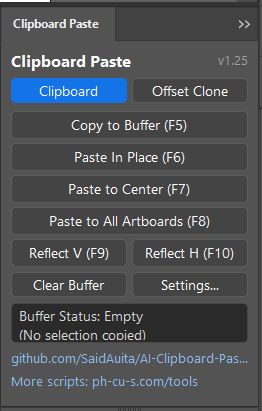
Download Plugin
Tested on Adobe Illustrator CC 2020 – 2026+. Open source on GitHub under MIT License.
⚡ Download Native Plugin (v1.27 ZIP — Recommended) 🌐 Download CEP Extension (v1.0.12 ZIP) View C++ Source on GitHubQuick Native Installation:
- Close Adobe Illustrator.
- Extract
Clipboard_Paste_Plugin_v1.27.zipand runInstall_Plugin.bat(automatically installs into Illustrator Plug-ins). - Open Illustrator: navigate to Window > Clipboard Paste.
- Global hotkeys F5..F8 (buffer), F9/F10 (reflect), Ctrl+[1..9] (offset clone), Alt+[1..9] (offset move), and Ctrl+Alt+[1..9] (step divisor) are active immediately!